

The console
stretto-console is stretto's management plane: a web app on your own machine, over the files stretto writes to ~/.stretto. In one place it shows:
- Servers. The MCP servers stretto fronts. Each has its upstream (a command, or a Streamable HTTP URL), its mode (recording, shadow or serving), its flow, and the configuration to paste into Claude Code, Claude Desktop, Cursor or VS Code. A connection test lists the server's tools as they are now, and says where the flow's view of them no longer holds.
- Sessions. Every recorded session, call by call:
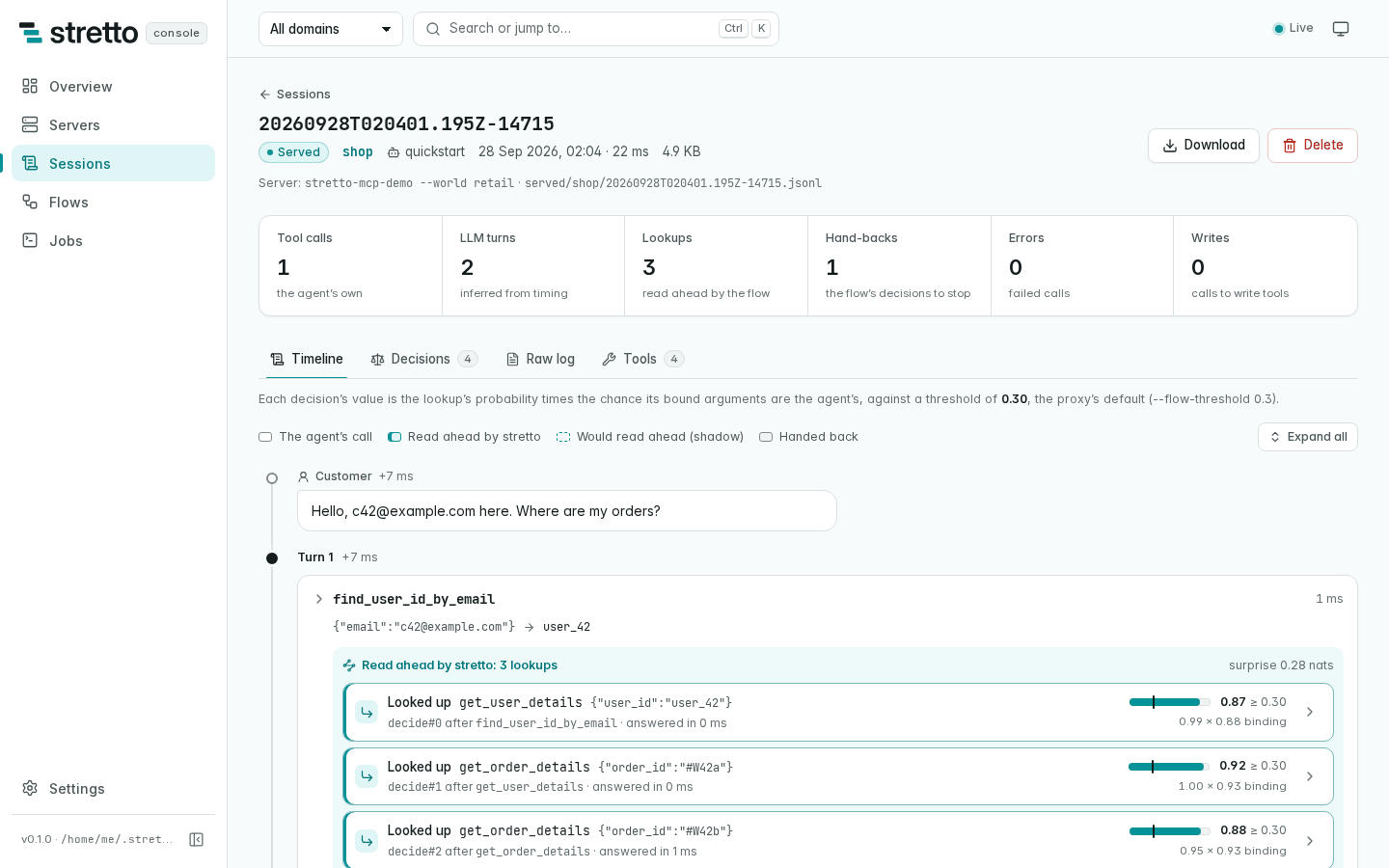
- the agent's calls and the flow's lookups, with their arguments and results;
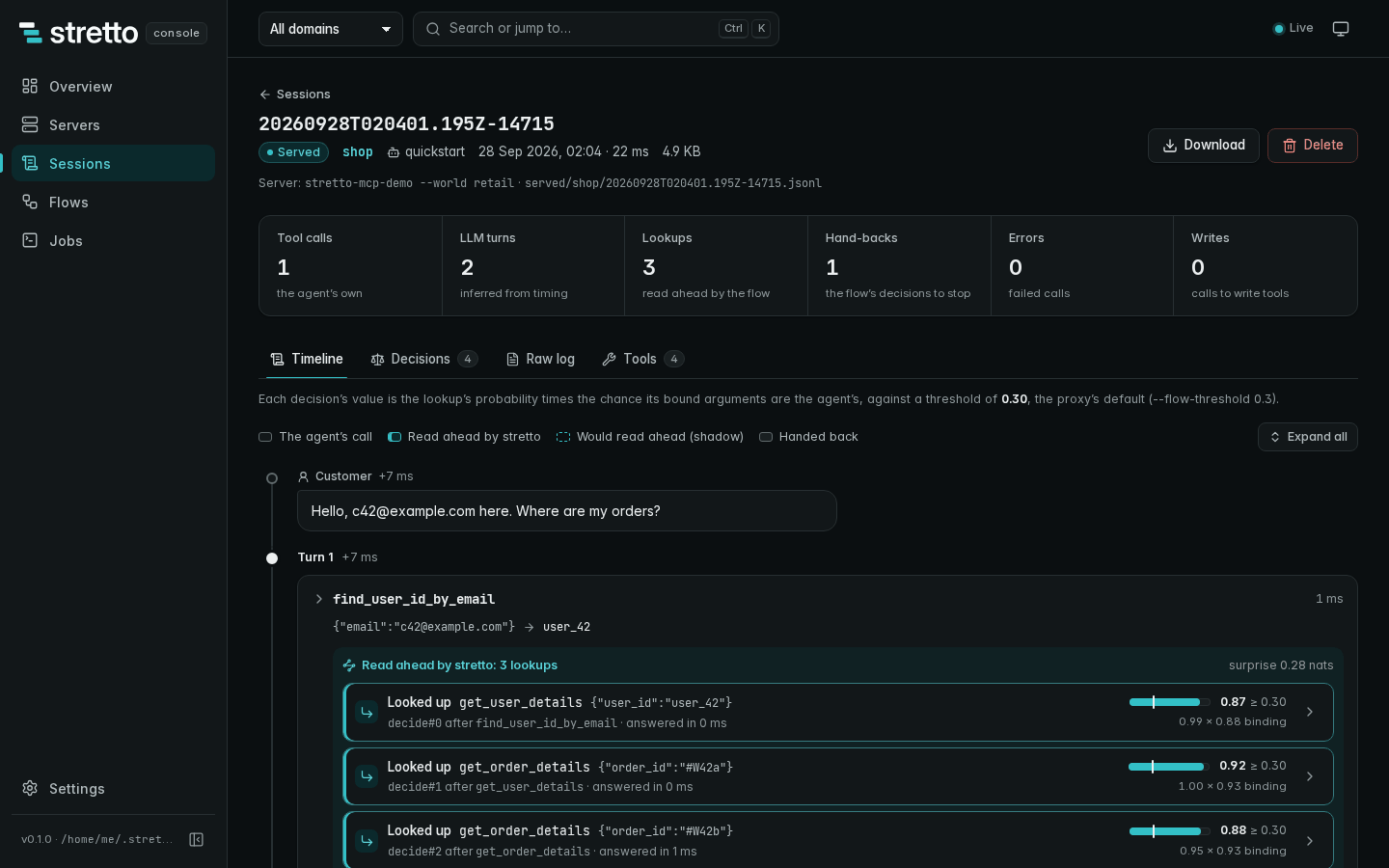
- why each lookup was made (its share × binding against the threshold), and why the flow handed back;
- the conversation, and the confirmation judge's log.
- Flows. Each flow as a reviewer reads it:
- the graph of calls and the lookups that follow them;
- the sites and their bindings;
- what would act at another threshold;
- the difference from another flow;
- its staged next version, how the two did on the sessions as they arrived, and every committed version: commit or roll back from there.
- Jobs.
learn,promote,audit,stage,redactanddoctor, run from the page, with their output as it comes and the files they wrote.


It reads everything through stretto's own code, so what it shows is what stretto flow-show, stretto init, stretto flow-log and stretto doctor say. The one file it owns is servers.json, the registry of servers. The crate's README documents its API.
Start it
stretto-console
# stretto-console: /home/me/.stretto on 127.0.0.1:7878
# stretto-console: open http://127.0.0.1:7878/?token=3f9c…
Open the URL it prints: the token in it signs the browser in. --open opens it for you, and --data DIR serves another data directory than ~/.stretto (or $STRETTO_HOME). Ctrl-C stops it.
The release archives, install.sh and install.ps1 install stretto-console beside stretto, from the first release after 0.1.0 (installing). Until then, build it from a checkout.
From a checkout
The UI is built with Node 22.12 or later, and the binary embeds it:
make console # builds the UI, then runs the console on ~/.strettomake console ARGS="--read-only --open" passes options through. To install the binary, build the UI first, since the release build embeds what console/dist holds when it compiles:
npm --prefix console ci && npm --prefix console run build
cargo install --locked --path crates/stretto-console
A build made without console/dist serves the API and, at /, a page that says how to build the UI.
In a container
ghcr.io/alexnodeland/stretto-console is the console, with the stretto CLI beside it for its jobs. It is published from the first release after 0.1.0; until then, docker compose up -d --build builds it from a checkout. It serves on port 8080 in the container, and keeps its data in /data/.stretto. compose.yaml runs it over your ~/.stretto:
STRETTO_UID=$(id -u) STRETTO_GID=$(id -g) docker compose up -d
docker compose logs console     # the URL to open, with its token
Or with docker run:
docker run -d --name stretto-console -p 127.0.0.1:8080:8080 \
  --user "$(id -u):$(id -g)" -v "$HOME/.stretto:/data/.stretto" \
  ghcr.io/alexnodeland/stretto-console
docker logs stretto-console
It runs as your user, so that the files the console writes (servers.json, the jobs, the trash) are yours; on macOS and Windows, Docker Desktop maps ownership and --user can be left out. The port is published on 127.0.0.1 only. The image's health check runs stretto-console healthcheck. STRETTO_CONSOLE_TOKEN fixes the token, so the URL stays the same across restarts, and TYPESAFE_API_KEY, when set, reaches the jobs that fit an arbiter; compose passes both through from your environment. Build the image from a checkout with make docker-console, or docker build --target console -t stretto-console ..
Options
| Option | What it does |
|---|---|
--data DIR | The data directory to serve. Default $STRETTO_HOME, else ~/.stretto |
--listen ADDR | Where to listen. Default $STRETTO_CONSOLE_LISTEN, else 127.0.0.1:7878 |
--token TOKEN | The token the API requires. Default $STRETTO_CONSOLE_TOKEN, else a new one, printed with the URL |
--no-auth | No token, on a loopback address only (sign in) |
--read-only | Refuse every change |
--open | Open the console in the browser ($BROWSER when it is set) |
--stretto PATH | The stretto CLI its jobs run. Default: the one beside stretto-console, else the one on PATH |
stretto-console healthcheck asks the console on this machine for /api/health, and exits with 0 when it answers. It is the container's health check. Environment variables has the variables it reads.
Sign in
Every request to the API needs the console's token, and every change also needs a header that a page on another site cannot send.
The token is new at each start and printed in the URL.
--tokenorSTRETTO_CONSOLE_TOKENfixes it, and a token you give is never printed: openhttp://127.0.0.1:7878/?token=<your token>. Opening the URL sets a cookie (HttpOnly, SameSite=Strict), and the page reloads without the token in it. Sign out in Settings clears the cookie.Scripts send
Authorization: Bearer <token>, andX-Stretto-Console: 1on POST, PUT and DELETE:shcurl -H "Authorization: Bearer $STRETTO_CONSOLE_TOKEN" http://127.0.0.1:7878/api/overview--no-authturns the token off, and only on a loopback address (127.0.0.1,[::1]). It then answers only requests addressed tolocalhost,127.0.0.1or[::1], so another site that resolves its name to your machine gets nothing.--read-onlyrefuses every change: no edits to the registry, no connection tests, no jobs, nothing moved to the trash.
From another machine
The console serves plain HTTP. To use one that runs on a server, forward its port over SSH rather than listening on a public address:
ssh -L 7878:127.0.0.1:7878 me@server stretto-consoleThen open the printed URL on your own machine. On a shared machine, --read-only gives a view that cannot change anything. To serve it more widely, put it behind a reverse proxy that terminates TLS, and keep the token.
The pages
The console follows the data directory as it changes: a new session, flow or job shows up within a second, without a reload. Ctrl-K (⌘K on a Mac) jumps to any page, server, session or flow, and the domain filter at the top narrows every page to one domain. The pages work from a phone's width up.
Overview
This week's sessions, and every session's tool calls, lookups served and shadow decisions; the tool calls of the last 14 days, as a chart or a table. Each domain, with its mode, flow, server and last session. The newest sessions and jobs, and the checks stretto doctor makes. The picture at the top of this page is one. With no data yet, it shows the three steps to get some: add a server, use your agent through it, learn a flow.
Servers
The registry. Add or edit a server: a command or a URL, the environment variables and headers it needs (by name, never their values), its mode, flow, decider and threshold, and the flow's surprise gate: as the flow stores it, off, or at another threshold (--flow-surprise). A server can keep its flow to some of its lookups (--flow-tools): a read changes nothing, but it can be metered, rate-limited or recorded as an access. Under Writes and retention: the policy guards on the agent's calls (retail and airline have them), the confirmation judge on the writes they check, with the file the host appends the conversation to, stretto_commit, and how many days the proxy keeps the sessions it records and its cached answers. Each is a flag in the proxy's command line, as stretto init writes it. Under How hosts connect, a server can have one proxy that every host connects to by URL, over Streamable HTTP (--listen), rather than each host starting its own: on a loopback address, or on any with a token file. Its configuration for each host then names the URL, and its next steps start the proxy; Claude Desktop, which starts its servers as commands, still starts its own. A server's page has the configuration to paste into Claude Code, Claude Desktop, Cursor or VS Code, and the connection test. Upstreams found in recorded sessions but not in the registry can be added in one click.


Sessions
Every session, filtered by domain, mode or text. A session's page is its timeline: the conversation, each call with its arguments and result, and under it the lookups the flow made ("read ahead by stretto"), each with its probability against the threshold. In shadow mode, the lookups it would have made. A session in which the flow's surprise gate tripped is marked in the list, and its page says after which call, and what the gate measured: from there the flow handed back after every call. Tabs hold every decision in a table, the raw log, and the tools. A session can be downloaded, or moved to the trash.
Flows
Every flow. A flow's page shows its graph, with a threshold slider that shows which lookups would act at another threshold. It has the sites with their bindings, the tools (the writes, which a flow never calls, flagged), the review as flow-show prints it, and the raw JSON. From there you can compare it with another flow, download it, promote it, audit it, or check its sessions for drift. When the last drift job on a flow sounded its alarm, its page says so at the top: when, how many sessions ago the change likeliest came, where the flow's surprise rose most, and any tools the agent called that training never saw, with a link to the report. The overview's health lists it too.
Its Staged tab is its staged learning:
- the flow a
stagejob learns beside it from the sessions as they arrive; - how the two did on those sessions, site by site: the lookups each would have made, how many the agent made later, with a 90% interval on the share, and the detours;
- what committing the staged flow would change, as
flow-difflists it; - every committed version, with the evidence each commit rested on.
Commit the staged flow, with a note, or roll back to any version from there. The staged flow's own page names the flow it is staged for.


Jobs
New jobs, the queue, and each job: its output as it comes, and the files it wrote, such as a new flow or an audit's report, which the page renders. A job can be cancelled while it waits or runs, and run again once it has ended: a job that writes where you say (learn, promote, redact) opens the form with its parameters, to change the path or let it replace the file.


Settings
The data directory and its size by kind, the binaries found, whether a Jev key is set (never its value), the read-only mode, the theme, and sign out.
What it changes
It writes these, all in the data directory:
servers.json, the registry, each time you save a server;console/jobs/, each job with its output, and the reports jobs write;console/trash/, where a deleted session or flow is moved, never unlinked. Empty it when you choose;- when you commit a staged flow or roll back, the committed flow and its versions in
<name>.history/, asstretto flow-commitandflow-rollbackwrite them.
It never edits an MCP host's configuration: it shows the snippet to paste, as stretto init prints it.
Jobs
Jobs run the stretto CLI in the data directory, one at a time, in the order they were queued, with the console's environment. So a job that fits an arbiter needs TYPESAFE_API_KEY (or TYPESAFE_API_KEY_FILE) where the console runs, and redact needs STRETTO_REDACT_SALT. The console only checks whether they are set. learn and promote never write over an existing file unless you ask. stage writes the staged flow beside the flow you name, never the flow itself. doctor checks the data directory the console serves. drift exits with 1 while its alarm sounds, which the job records as an alarm, not a failure: the job succeeded, and found the agent changed under the flow. A queued or running job can be cancelled from its page: a queued one never runs, and a running one's stretto is killed, then the job ends cancelled. Stopping the console stops its job too, which is marked as failed at the next start.
Limits
- The connection test starts a stdio server's command on the machine the console runs on, with the console's environment, for 15 seconds at most. In the container, which has no Node or Python, it can test a Streamable HTTP server, but not a stdio server that needs them; run the console on your own machine for those.
- One user. Anyone with the token can do anything the console does.
--read-onlyis the only role. - Plain HTTP. See from another machine.